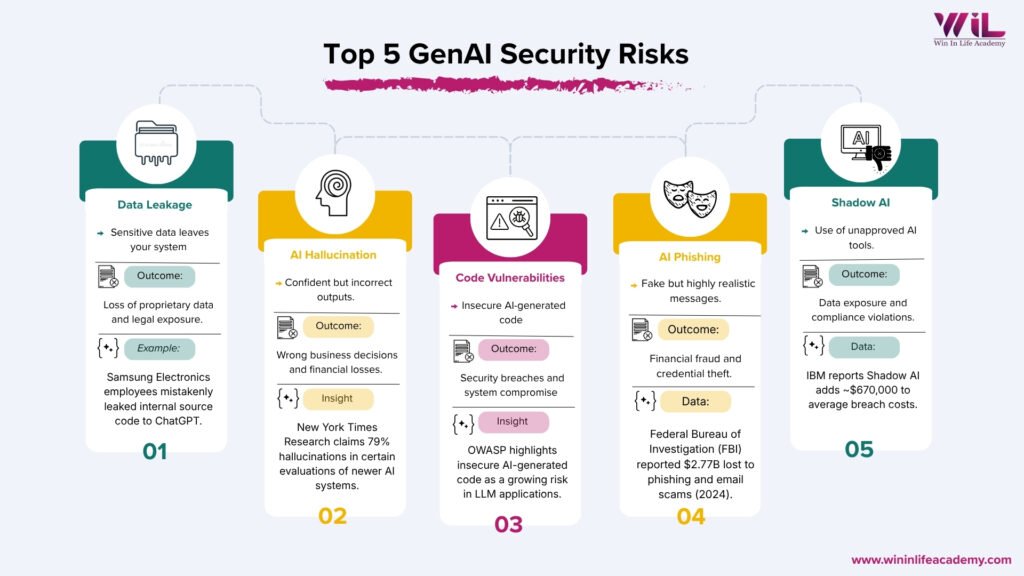
GenAI security risks occur when employees use generative AI tools without understanding how data is handled or outputs are generated. The top 5 GenAI security risks include AI data leakage, incorrect outputs, insecure code, phishing, and Shadow AI usage. These risks often come from everyday actions that seem harmless but can create serious business exposure.
You probably use GenAI at work already. Maybe you paste code into ChatGPT when you are stuck. Maybe you ask it to summarize a document, draft an email, or clean up a report before a deadline. It is fast, it is useful, and honestly, it does not feel like you are doing anything wrong.
That is exactly the problem.
Most professionals using GenAI daily are not thinking about security. They are thinking about getting work done. And in that space between “just getting it done” and “understanding what actually happens to the information you share,” real risks are building up quietly.
You have probably already done at least one of these this week:
- Pasted a piece of code or script into an AI tool to fix a bug faster
- Uploaded or copied part of an internal document to get a quick summary
- Asked AI to write an email or draft a report on your behalf
- Used a free AI tool, maybe one your company did not officially approve
None of this looks like a security decision. It looks like doing your job efficiently. But here is what most people do not know: the moment that information leaves your screen and enters a public AI system, you lose control over where it goes.
Generative AI security risks do not start with hackers. They start with how you use the tool.
This blog walks you through the five GenAI security risks that working professionals need to understand, why they matter even if you are not in IT or cybersecurity, and what you can actually do about it starting today.
Key Takeaways
- Most GenAI security risks do not start with hackers or system failures, they start with routine habits like pasting data, trusting outputs, and using unapproved tools without a second thought.
- Sensitive company data is already leaving your organization through AI tools; research shows over 27% of data employees enter into AI tools qualifies as sensitive, and most people do not realize it when it happens.
- AI-generated outputs, including written content and code, can look completely correct while being wrong or insecure; verifying before you act is no longer optional, it is a basic professional standard.
- The professionals who get trusted with more responsibility in an AI-driven workplace are not the ones who use AI the most; they are the ones who understand where it can go wrong and act accordingly.
GenAI Is Not Just a Tool Anymore
A few years ago, using an AI tool at work was unusual. Today, according to IBM’s Institute for Business Value, 96% of executives say adopting generative AI makes a security breach likely in their organization within the next three years. That is not a trend. That is a complete shift in how work happens, and how risk happens alongside it.
But here is what that shift also brought: a new kind of risk that did not exist at this scale before.
GenAI tools work by taking your input, whatever you type or upload, processing it, and generating an output. That interaction looks simple. But underneath it, data is moving, being processed, and in many cases being stored outside your organization’s environment. Most people using these tools do not think about any of that while it is happening.
The issue is not that GenAI is dangerous. It is that it is being used as if it is not.
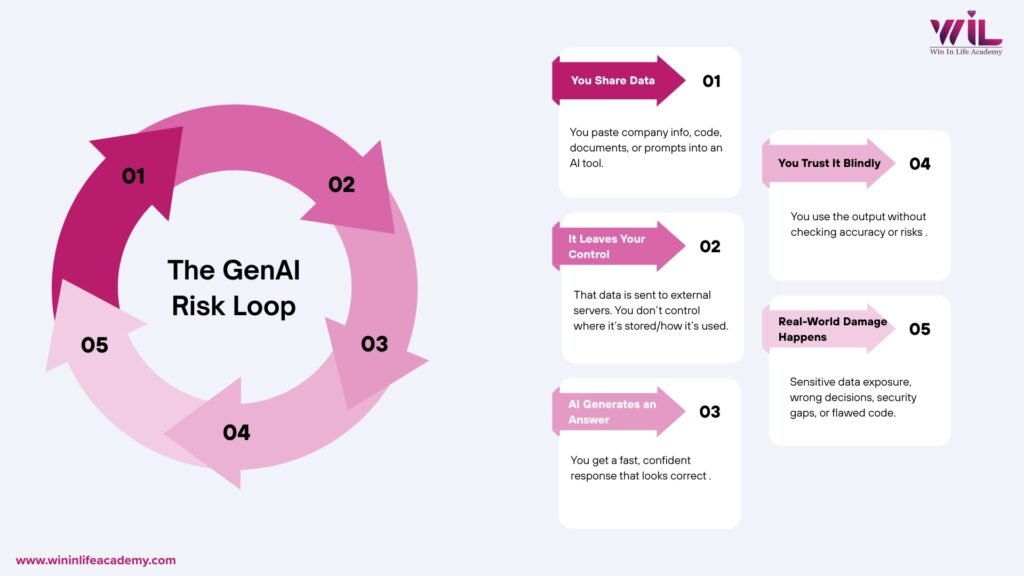
The GenAI Risk Loop: How Everyday Actions Turn Into Security Problems
Most GenAI security risks do not start with cyberattacks. They start with normal usage.
Every time you interact with a GenAI tool, the same sequence plays out:
Input > Processing > Output > Trust > Impact
- Input: You share data, prompts, or business context with the system
- Processing: The system handles that data outside your direct control
- Output: It generates a response that looks structured and reliable
- Trust: You accept or act on that response without questioning it
- Impact: That action creates a downstream effect, whether it is a wrong decision, a data leak, or a vulnerability introduced into your work
This loop repeats every single time you use GenAI.
The problem is not any one step in isolation. It is that the entire loop happens without friction, without warnings, and without visibility. Nothing looks wrong. Nothing breaks immediately. And that seamlessness is exactly what allows small actions to quietly scale into larger problems.
Understanding this loop is how you start making better decisions about when and how to use these tools.
Key Generative AI Security Risks You Can’t Ignore
Data Leakage and Confidential Exposure
This is the most common GenAI security risk, and it is already happening at companies around the world.
When you paste information into a public AI tool, whether it is code, client data, internal reports, or financial details, that information is processed outside your organization’s environment. Most public GenAI platforms operate on external servers. Once your data goes in, you have no control over how it is stored, whether it is used to train the model, or who can access it later.
This is not a hypothetical risk. In 2023, Samsung engineers leaked sensitive semiconductor source code and internal meeting notes by pasting proprietary information into ChatGPT while trying to fix a bug and generate meeting minutes. Three separate incidents happened within 20 days of the company allowing ChatGPT access. Samsung’s own trade secrets ended up in OpenAI’s training data, not because of a cyberattack, but because employees were trying to do their jobs faster.
Research by Cyberhaven found that 27.4% of corporate data employees put into AI tools is sensitive, including source code, HR records, legal documents, and financial data, and that figure has been rising year over year.
What makes this particularly risky:
- You may not realize something is sensitive until it is too late
- There are no warnings when you cross a line
- The damage is not always visible immediately
Simple rule: If you would not share it with a stranger, do not paste it into a public AI tool.
Overtrust in AI-Generated Outputs
GenAI tools are built to sound confident. They give you structured, well-worded, authoritative-sounding responses, even when those responses are completely wrong.
This is called hallucination. And it is more common than most people think.
Recent industry estimates suggest that AI hallucinations have become a significant business risk, with some reports calculating global enterprise losses in the tens of billions for 2024. Additionally, survey data indicates that a notable portion of enterprise AI users may be acting on unverified model outputs, highlighting the urgent need for robust human-in-the-loop verification processes.
Research from MIT highlights a persistent flaw in modern AI: models are trained in ways that often reward confident output, leading them to present incorrect information with the same perceived certainty as factual data. This overconfidence is a well-documented by-product of standard training frameworks, posing a significant risk for users who mistake an AI’s tone for accuracy.
If you are using AI to write reports, generate data summaries, draft client-facing documents, or inform decisions, and you are not verifying what you get, you are building on a foundation that can crack without warning.
What this leads to in practice:
- Reports with inaccurate figures presented to leadership
- Client communications with incorrect information
- Business decisions made on outputs that look right but are not
Simple rule: Treat every AI output as a starting point, not a final answer. Verify anything that matters before you act on it or share it.
AI-Generated Code Vulnerabilities
If you are a developer, data analyst, or anyone who works with code, this one affects you directly.
AI coding assistants can help you write code faster. But faster does not mean secure. AI-generated code can include insecure coding patterns, outdated libraries with known vulnerabilities, and weak authentication logic, all wrapped in clean-looking output that passes a quick visual check.
The danger is not that the code looks wrong. It is that it looks right. Developers under time pressure often accept AI-generated code without a thorough security review because the output appears functional. But code that works and code that is secure are not the same thing.
Research consistently shows that a significant portion of AI-generated code contains security vulnerabilities that would not be immediately obvious during standard code review. According to Gartner, by 2027, more than 40% of AI-related data breaches will be caused by the improper use of generative AI, with insecure code being a key contributing factor.
Once vulnerable code reaches production, it becomes an entry point. And the time between when the code was accepted and when the vulnerability is discovered can be long enough that tracing it back to an AI tool becomes nearly impossible.
What this leads to in practice:
- Security gaps entering live systems without detection
- Vulnerabilities that surface months later, making them costly to fix
- A false sense of confidence because the code ran fine
Simple rule: Apply the same review standards to AI-generated code as you would to any other code. Running it is not the same as auditing it.
AI-Powered Phishing and Impersonation
This risk is different from the others. Here, you are not the one creating the problem. You are the target.
GenAI has made it significantly easier for attackers to craft convincing phishing emails, fake documents, and impersonation messages. Where phishing attacks once had obvious signs, poor grammar, generic greetings, awkward phrasing, AI-generated attacks now read like professional communication. They can be personalized, contextually accurate, and indistinguishable from legitimate messages.
The numbers are striking. According to the FBI’s 2024 Internet Crime Report, business email compromise and phishing scams resulted in over $2.77 billion in reported losses in 2024 alone across 21,442 complaints. Total cybercrime losses hit a record $16.6 billion, a 33% increase from 2023.
The filters and red flags professionals have been trained to spot are becoming less reliable. An email from your “manager” asking you to urgently approve a transfer, or a “colleague” sharing a document that requires your credentials to open, these are the kinds of messages GenAI now makes trivial to produce at scale.
What this leads to in practice:
- Employees approving fraudulent requests because the communication looks legitimate
- Credential theft through fake login pages that appear credible
- Financial losses that are often unrecoverable
Simple rule: Slow down before acting on any urgent or unusual request, regardless of how professional it looks. Verify through a second channel before responding to anything involving money, credentials, or sensitive access.
Shadow AI Risks and Unmonitored Usage
This is the risk most professionals do not think of as a risk at all. It just feels like being resourceful.
Shadow AI refers to using AI tools at work that have not been approved or monitored by your organization. A free version of ChatGPT. A browser extension powered by AI. A tool you found that summarizes documents in seconds. These tools work. They save time. And most people use them without giving it a second thought.
The scale of this is significant. A 2024 survey by Software AG found that 50% of employees were using unapproved AI tools at work. Of those, 46% said they would continue using them even if their company explicitly banned it.
Research by CybSafe and the National Cybersecurity Alliance found that 38% of employees share confidential data with AI platforms without approval from their employers.
According to IBM’s 2025 Cost of a Data Breach Report, shadow AI risks adds an average of $670,000 to breach costs and was responsible for breaches at one in five organizations surveyed.
The problem is not that employees are using AI. It is that when they use tools outside approved systems, their organization has zero visibility, zero control, and zero ability to step in if something goes wrong.
What this leads to in practice:
- Sensitive data shared with third-party platforms no one vetted
- No audit trail if something goes wrong
- Compliance violations the company did not know were happening
Simple rule: If the AI tool you are using was not approved by your organization, assume it does not meet your organization’s security standards, because it probably does not.
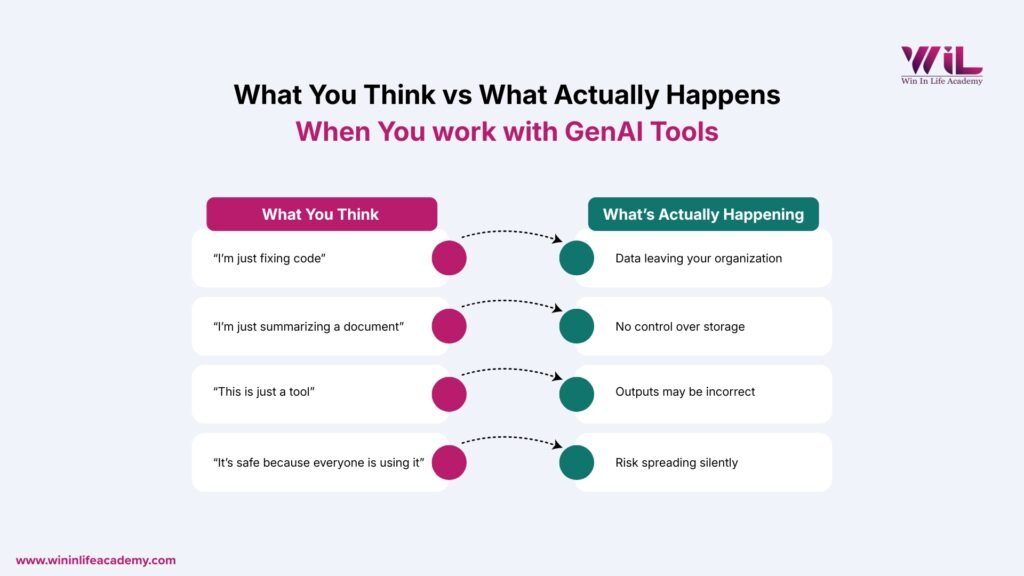
Why Most Professionals Don’t Realize They’re Creating Risk
GenAI Tools Feel Like Productivity, Not Risk
When you are using an AI tool to finish work faster, you are not thinking about data flows or model training. You are thinking about the task. The interface is simple, the result is immediate, and nothing breaks. That feeling of seamlessness is exactly what removes the caution the situation warrants.
There Are No Warnings
GenAI tools do not flag sensitive input. They do not warn you when an output might be unreliable. They do not ask whether you checked with IT. They process what you give them and return a result. The responsibility for judgment sits entirely with you, and most people do not realize that.
The Damage Is Delayed
With most traditional mistakes, something breaks immediately and you know something went wrong. With GenAI risks, nothing breaks right away. The data you shared is stored somewhere you cannot see. The incorrect report gets filed. The vulnerable code goes live. Everything appears fine, until it is not. By the time the problem surfaces, tracing it back to a specific action is difficult.
Countermeasures: How to use GenAI safely at work
Don’t Share Sensitive Data Unless You’re Certain It’s Safe
Before you paste anything into an AI tool, ask yourself one question: would I be comfortable if my manager, my client, or my company’s legal team could see exactly what I just shared and where it went?
If the answer is no, do not share it.
Stick to anonymized data, generic examples, or publicly available information when working with public AI tools. For anything sensitive, use only enterprise-approved platforms your organization has vetted and that operate within controlled environments.
Treat AI Outputs as Drafts, Not Decisions
Every AI-generated output, whether it is a summary, a recommendation, a piece of analysis, or a data point, should be treated as a first draft that needs verification, not a final answer ready to use.
Before you send, publish, present, or act on AI-generated content, verify the key claims, check the numbers, and read it critically. Think of AI as a fast way to get to a starting point, not a shortcut to a final one.
Apply the Same Code Review Standards to AI-Generated Code
AI-generated code does not come with a security guarantee. Run it through your standard security review process without exception. Check dependencies, validate libraries, review for insecure patterns, and never push it to production based on a quick glance.
The fact that it was generated by AI is not a reason to trust it more. If anything, it is a reason to look more carefully.
Be Skeptical of Urgent or Unusual Communication
When you receive a message that seems unusually polished, carries a sense of urgency, and asks you to act quickly, slow down. Verify the request through a separate channel before doing anything. This applies to emails, messages, document-sharing requests, and anything else that feels even slightly off.
The better AI gets at generating convincing communication, the more important it becomes to pause before you respond.
Use Only Approved AI Tools
Check with your organization about which AI tools are approved for work use. If there is a policy, follow it. If there is not one, that is not a green signal. It is a gap, and using unvetted tools in that gap is still your professional risk.
Using an approved tool does not just protect the company. It protects you.
The Real Gap Most Professionals Have
Most professionals today have learned how to use GenAI effectively. They know how to write better prompts, get faster outputs, and apply AI across more of their work. That is useful.
But knowing how to use a tool and knowing how that tool actually behaves are two very different things.
GenAI systems do not follow fixed rules. They generate responses based on patterns and probabilities. They do not know what is sensitive, what is confidential, or what is accurate in the way a person would. They produce outputs that sound reliable and leave the judgment call entirely to the person using them.
Most professionals have not been taught to think about that layer. They interact with the output without understanding what sits underneath it.
That is the gap. And it is the gap where most GenAI-related mistakes happen.
Why Cybersecurity Fundamentals Matter More Than Ever
GenAI did not create data exposure, social engineering, or insecure code. It amplified them. The underlying risks, how data moves, how systems can be exploited, how trust can be manipulated, are rooted in cybersecurity fundamentals that have existed long before AI tools became part of daily work.
What GenAI changed is the scale and the ease. Attacks that once required technical expertise can now be executed with a prompt. Mistakes that once took deliberate effort can now happen in seconds, without any intent.
These are not advanced technical failures. They come down to basic things: what you share, what you trust, and how you use the tool.
That is why this is not an AI problem. It is a fundamentals problem.
If you do not understand how data moves, where control ends, and why outputs can mislead you, GenAI does not just make you faster. It makes your mistakes faster.
Conclusion
GenAI is already part of how most professionals work. That is not going to change. But the risks that come with it are not coming from somewhere else. They are coming from the everyday decisions you make when you paste data, trust an output, accept a piece of code, or open a tool without thinking twice.
Most of these mistakes do not look like mistakes when they happen. That is what makes them dangerous. The professionals who will navigate this well are not the ones who use AI the most. They are the ones who understand how to use AI safely at work and make better decisions because of it. That starts with knowing where the risks are. Now you do. The next step is understanding the systems behind them.
At Win In Life Academy, the Cybersecurity program is built around practical, real-world knowledge: how systems get exposed, how attacks actually happen, and how to work with modern tools including AI without becoming a risk yourself. If you are already using AI at work, this is not optional knowledge. It is the foundation that makes everything you do with AI safer and more reliable.
Because in an AI-driven workplace, using the tool is expected. Understanding the risk behind it is what sets you apart.
Frequently Asked Questions
1. What are GenAI security risks?
GenAI security risks are threats that arise from how generative AI tools are used in professional and business environments. These include accidental AI data leakage, over-reliance on incorrect AI outputs, insecure AI-generated code, AI-powered phishing attacks, and the use of unauthorized AI tools without organizational oversight. Most of these risks are not caused by hackers. They are caused by everyday usage habits that feel harmless but are not.
2. How does using ChatGPT or similar tools create a data leakage risk?
When you paste company data, source code, client information, or internal documents into a public AI tool, that information is processed on external servers outside your organization’s control. In many cases, this data can be stored or used to improve the model. The Samsung incident in 2023, where engineers accidentally leaked proprietary source code and meeting notes through ChatGPT, is one documented example of how quickly this can happen without any malicious intent.
3. What is Shadow AI and why should I care about it?
Shadow AI refers to the use of AI tools at work that have not been approved or monitored by your organization. When employees use unapproved tools, the organization has no visibility into what data is being shared, no way to enforce security controls, and no audit trail if something goes wrong. Research shows 50% of employees are already using unapproved AI tools, and 38% have shared confidential data through them without employer knowledge.
4. What is AI hallucination and how does it affect my work?
AI hallucination is when a generative AI model produces incorrect, fabricated, or misleading information while sounding completely confident. This is a structural behavior of how these models work, not a bug that gets fixed. If you use AI-generated outputs in reports, analysis, or client communication without verifying them, you risk spreading incorrect information that can affect decisions, relationships, and outcomes.
5. Is AI-generated code safe to use directly in production?
Not without review. AI-generated code can appear clean and functional while containing insecure patterns, outdated dependencies, or weak authentication logic. Code that runs without errors is not the same as code that is secure. All AI-generated code should go through the same security review process as any other code before it is deployed.
6. How can I tell if an email or message was generated by AI?
This is increasingly difficult, which is part of the problem. AI-generated phishing messages no longer have the obvious grammar errors or generic phrasing that used to be red flags. The more reliable approach is to focus on context rather than style: did you expect this message, does the request feel unusual, and does it ask you to act quickly without time to verify? If the answer to any of these is yes, verify through a separate channel before responding.
7. What is the difference between a secure AI tool and an unsecured one?
A secure, enterprise-approved AI tool operates within your organization’s data governance framework, meaning your data stays within controlled environments and is not used to train public models. An unsecured or unapproved tool, often a free public platform, processes your data on external infrastructure with limited transparency into how that data is stored or used. The key difference is visibility and control, not just the quality of the output.
8. Do these GenAI security risks apply to me even if I am not in IT or cybersecurity?
Yes. These risks apply to anyone who uses AI tools as part of their work, regardless of role or department. AI Data leakage, overtrust in outputs, and shadow AI usage are behaviors that happen across marketing, sales, operations, HR, finance, and development teams. You do not need to be technical to create a security risk, and you do not need to be in IT to avoid one.
9. What should I do if my company does not have an AI usage policy?
The absence of a policy is not permission to use any tool you want. It is a signal that your organization has not caught up with the pace of AI adoption, which is a risk in itself. In the meantime, apply conservative defaults: avoid sharing sensitive or proprietary information with any public AI tool, and raise the question of policy with your manager or IT team. Being the person who flags this gap is a sign of professional awareness, not overcaution.
10. How does learning cybersecurity fundamentals help with GenAI risks?
GenAI risks are not entirely new threats. They are amplified versions of risks that cybersecurity has always addressed: data handling, access control, trust boundaries, and social engineering. Understanding cybersecurity fundamentals gives you a mental framework for recognizing when something is risky, even when the interface looks harmless. It helps you ask the right questions before you act, which is exactly the skill that prevents most GenAI-related mistakes.
11. Is ChatGPT safe for office use?
ChatGPT can be safe for office use, but only when used with clear boundaries. It becomes risky when employees share sensitive company data, rely on outputs without verification, or use it outside approved systems. Most organizations treat public AI tools as external platforms, not internal tools.
To use ChatGPT safely at work, avoid inputting confidential information, verify outputs before using them, and follow your company’s AI usage policies. The tool itself is not the risk. How you use it is.
12. Can AI tools leak confidential company data?
Yes. AI tools can leak confidential company data if sensitive information is shared without proper controls. When you paste internal documents, source code, client details, or financial data into public AI tools, that data is processed on external servers outside your organization’s control.
Incidents like the Samsung Electronics data leak in 2023 show how easily employees can expose proprietary information while trying to complete everyday tasks.
AI systems do not understand confidentiality. They process what you give them. That makes the user responsible for what gets shared.
13. How do companies control Shadow AI risks?
Companies control Shadow AI risks by creating visibility, governance, and clear usage policies around AI tools. This includes approving specific tools for work use, monitoring how data is shared, restricting unapproved applications, and training employees on safe AI practices.
Organizations also follow frameworks from bodies like the National Institute of Standards and Technology to manage risks related to data handling and system usage.
Without visibility into how AI tools are used, companies cannot enforce security controls. That is why managing Shadow AI starts with knowing what tools are being used and how.