Python is the “interface”, but its libraries are the “engine.” While Python is easy to read, it is too slow for heavy math. Libraries like NumPy and PyTorch are written in C++ and CUDA, allowing you to run supercomputer-level calculations with simple code. Without these libraries, a model that takes minutes to train would take weeks, making professional AI development impossible.
If you’ve started learning machine learning with Python, you’ve probably noticed one thing very quickly.
There are too many libraries.
NumPy, Pandas, Matplotlib, Scikit-learn, TensorFlow, PyTorch, XGBoost. The list keeps growing, and most of the time, you’re not sure which ones actually matter or where to start.
Some resources throw multiple libraries at you at once. Others focus too much on one tool without explaining how it fits into the bigger picture. So you end up learning pieces, but not understanding how they come together.
Python didn’t become the go-to language for machine learning because it has more libraries. It became popular because the right set of libraries can handle almost everything you need. From working with data to building models, Python simplifies what would otherwise be complex and time-consuming tasks. Even the official Python applications page highlights how widely it’s used across data science and AI.
That’s the real problem.
It’s not a lack of resources. It’s the lack of clarity on which Python libraries you actually need and how they connect in a real workflow. This is especially true for those searching for Python libraries for machine learning beginners, where guidance often feels scattered or overwhelming.
Instead of covering everything, it narrows down the core Python libraries that are actually used in machine learning projects and shows where each one fits.
Once you see that, the learning path becomes much clearer.
Why Python Libraries Are the Industry Standard
Python’s syntax is the engine, but its libraries are the industrial power. Without them, Python is too slow and fragmented for modern Machine Learning.
- Industrial Speed: Python is naturally slow. Libraries like NumPy and PyTorch are actually written in C++ and CUDA. Using them gives you supercomputer math speeds with simple Python code. Without them, your models would take weeks to run instead of minutes.
- Professional Reliability: These tools are battle-tested by millions. Using Scikit-learn ensures your math is scientifically sound and your code is instantly understood by any professional team. Writing your own math from scratch is a liability, not an advantage.
- Career Velocity: Building an algorithm from scratch takes months; using a library takes seconds. In a professional setting, libraries are the only way to meet a deadline.
The Connected Assembly Line
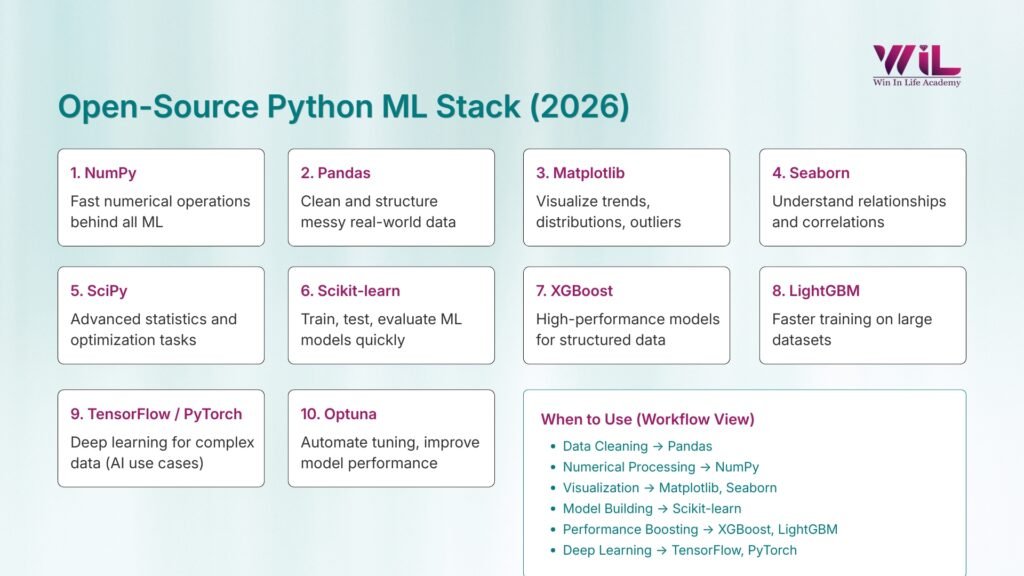
Instead of seeing these as separate tools, view them as a unified system. You don’t just “pick” a library; you move through a structured workflow:
- Data Processing: Cleaning “messy” data (Pandas/NumPy).
- Visual Insight: Seeing patterns that numbers hide (Matplotlib/Seaborn).
- Core Modeling: Applying the “brain” to the data (Scikit-learn/TensorFlow).
Learning Python for ML without its libraries is like studying music theory but never picking up an instrument. The libraries are where the actual work happens.
“In machine learning, your goal is to spend more time working on your data and your model, and less time writing the code that connects them.”
Top Python Libraries for Machine Learning Every Beginner
These libraries are not random. They are widely used in real projects and together support the complete machine learning workflow, from working with data to building and improving models.
Let’s look at the ones you should learn first.
1. NumPy — Foundation for Numerical Computing in Machine Learning
NumPy is a library that helps Python work with numbers faster and more efficiently.
In machine learning, everything is handled as numbers, from raw data to model predictions. While Python can manage this using lists, it becomes slow and impractical when the data grows. NumPy solves this by using arrays, which are designed specifically for fast numerical computation.
This is exactly why NumPy matters.
It handles the core computations that almost every machine learning task depends on. Whether it’s transforming data, performing calculations, or preparing inputs for models, NumPy is working in the background.
More importantly, NumPy sits underneath most of the tools you’ll use later. Libraries like Pandas, Scikit-learn, and even deep learning frameworks rely on it internally. So even if you’re not using NumPy directly, your entire workflow is built on top of it.
That’s the reason it comes first in this list.
You don’t need to master it deeply, but once you’re comfortable with arrays and basic operations, the rest of the machine learning stack starts to feel much easier to understand.
2. Pandas — Data Handling and Data Preparation for ML Projects
If NumPy is the foundation, Pandas are where real data work begins.
In most machine learning projects, your first step is not building a model. It’s working with data. That means loading datasets, handling missing values, filtering rows, transforming columns, and preparing everything for modeling. Pandas is built exactly for this.
It introduces a structure called a DataFrame, which works like a spreadsheet but is much more flexible and powerful. You can read data from CSV files, Excel sheets, or databases, inspect it, and make changes with just a few lines of code.
This is where Pandas becomes essential.
Real-world data is rarely clean. You’ll deal with missing values, inconsistent formats, and unnecessary columns. Pandas help you fix all of this efficiently without writing complex logic.
For example, before predicting house prices or analyzing customer behavior, most of your time will go into cleaning and preparing the dataset.
That’s why it made this list.
In practice, a large part of your machine learning work will involve preparing data, and Pandas is the tool you’ll rely on the most for that.
3. Matplotlib — Basic Data Visualization for Machine Learning Analysis
Before building any model, you need to understand what your data is actually telling you. That’s where Matplotlib comes in.
Matplotlib is the core visualization library in Python used to create plots that help you inspect distributions, spot trends, and identify potential issues in your data.
- It helps you see how your data is distributed
- It reveals patterns, relationships, and outliers
- It prevents you from making decisions based on unseen issues
For example, a simple histogram can show if your data is skewed, while a scatter plot can help you understand how two variables are related.
Skipping this step can lead to poor models because machine learning depends heavily on data quality and distribution.
Matplotlib is also useful after modeling.
- You can compare actual vs predicted values
- Visualize model performance
- Identify where your model is going wrong
It may not look as polished as some higher-level libraries, but it gives you full control over how your data is presented.
That’s why it remains a fundamental part of every machine learning workflow.
4. Seaborn — Statistical Visualization for Understanding Data Relationships
Once you move beyond basic plots, you’ll need a clearer way to understand how your data points relate to each other. That’s where Seaborn comes in.
Seaborn is a visualization library built on top of Matplotlib, designed specifically to show statistical patterns in data. It helps you quickly understand relationships between features without writing complex plotting code.
- It makes it easier to visualize correlations between variables
- Helps you compare multiple features at once
- Turns complex data patterns into clear visual insights
For example, a heatmap can show how strongly features are related, while a pair plot helps you explore multiple variables together in one view.
This becomes especially useful during exploratory data analysis, where your goal is to understand patterns before building a model.
Instead of spending time configuring plots manually, Seaborn gives you structured and readable visuals with minimal effort.
That’s why it made this list.
Once your data grows and relationships become harder to spot, basic plots are no longer enough. Seaborn helps you move faster and understand your data more clearly, which directly impacts how well your models perform.
5. SciPy — Scientific Computing and Statistical Functions for Machine Learning
While libraries like NumPy and Pandas handle data and basic computations, SciPy comes into play when you need more advanced mathematical and statistical operations.
It builds on top of NumPy and provides tools for optimization, probability distributions, and statistical testing.
This is where it becomes useful:
- Helps with tasks like hypothesis testing and working with distributions
- Supports optimization used during model training and tuning
- Handles the mathematical logic behind many ML algorithms
You may not use SciPy directly in every beginner project, but it plays a role in how models are evaluated and improved.
That’s why it made this list.
It represents the deeper layer of machine learning. Once you start asking why a model behaves a certain way, SciPy is often part of the answer.
You don’t need to master it early, but knowing where it fits helps you move beyond just using tools.
6. Scikit-learn — Core Library for Building Machine Learning Models
This is where machine learning stops being theory and starts becoming real.
Scikit-learn lets you train, test, and evaluate models without dealing with complex math. It provides commonly used algorithms for regression, classification, and clustering, all designed to follow a consistent workflow.
- Train models with minimal code
- Follow a clear process: split → train → predict → evaluate
- Compare different models without changing your approach
Once you understand this flow, you’re no longer just learning concepts. You’re building models and seeing how they actually perform.
It’s also widely used for structured data problems, so the skills you build here directly translate to real projects.
You don’t need to learn every algorithm. Being able to train and evaluate a model confidently is what really matters.
7. XGBoost — High-Performance Machine Learning for Structured Data
Once you move beyond basic models, XGBoost is one name you’ll keep hearing.
It’s built on a technique called gradient boosting, where models are trained step by step, each one correcting the errors of the previous one. Instead of relying on a single model, it combines multiple weaker models to produce stronger predictions.
Where it really stands out is performance.
- Works extremely well on structured or tabular data
- Often outperforms basic algorithms on real-world datasets
- Handles complex patterns without heavy tuning
In tasks like predicting customer behavior, sales trends, or financial outcomes, XGBoost is often a strong choice when simpler models fall short.
It’s widely used in industry and has been a go-to model in machine learning competitions for a reason.
You don’t need to go deep into how boosting works. What matters is knowing when to use it.
When your baseline models stop improving, this is usually one of the first tools worth trying.
8. LightGBM — Fast and Efficient Gradient Boosting for Large Datasets
As your data grows, training time starts to matter as much as accuracy. That’s where LightGBM comes in.
Like XGBoost, it’s based on gradient boosting. The difference is how it handles scale. LightGBM is designed to train faster and use less memory, especially on large or high-dimensional datasets.
- Faster training compared to traditional boosting models
- Handles large datasets more efficiently
- Scales well without requiring heavy resources
In practice, when your model starts slowing down or your dataset becomes too large, LightGBM is often the next option to try.
It solves a practical problem.
Instead of waiting longer for similar results, you get speed without sacrificing much performance.
You don’t need to choose between LightGBM and XGBoost early on. But knowing that this option exists gives you flexibility when your projects start getting bigger.
9. TensorFlow or PyTorch — Deep Learning and Neural Network Development
So far, most of the tools you’ve seen work well for structured data. But when you move into areas like images, text, or complex patterns, you need something more powerful.
That’s where TensorFlow and PyTorch come in.
These frameworks are used to build and train neural networks. They handle large-scale computations, manage model architectures, and use GPUs to speed up training.
- Designed for deep learning tasks like image recognition and NLP
- Handle complex patterns that traditional models struggle with
- Scale well with large and unstructured data
You won’t need them for every problem.
For most beginner projects, simpler models are enough. Deep learning becomes useful when your data is unstructured or when basic models stop improving.
The key is to start with one.
Learning both at the same time can be confusing since they follow different approaches. PyTorch is often easier to get started with, while TensorFlow is widely used in production setups.
You don’t need to master deep learning right away. Understanding when to use it is more important than jumping into it too early.
10. Optuna — Hyperparameter Optimization for Improving Model Performance
Building a model is only the starting point. Getting it to perform well is where the real difference comes in.
Most machine learning models come with parameters that control how they learn. Default settings can give you a working model, but not the best one.
That’s where Optuna helps.
It automates the process of finding better parameter values by testing different combinations and learning from previous results.
- Removes manual trial-and-error
- Finds better-performing configurations faster
- Helps improve model accuracy with less effort
In practice, this is the step that takes a basic model to a more refined one.
You don’t need to tune everything early on. But once your model is working, learning how to improve it is what moves you beyond the beginner stage.
Optuna makes that step more efficient and structured.
| Library | What It Helps You Do | When You’ll Use It |
|---|---|---|
| NumPy | Work with numerical data efficiently | When handling arrays and computations |
| Pandas | Clean and prepare datasets | Before building any model |
| Matplotlib | Visualize data distributions | To understand trends and issues |
| Seaborn | Explore relationships in data | During deeper data analysis |
| SciPy | Handle advanced math and statistics | When working with optimization or stats |
| Scikit-learn | Build and evaluate models | For most ML tasks on structured data |
| XGBoost | Improve model performance | When basic models are not enough |
| LightGBM | Train faster on large data | When dataset size becomes a challenge |
| TensorFlow / PyTorch | Build deep learning models | For images, text, and complex data |
| Optuna | Tune and optimize models | When improving model performance |
PG Diploma in AI and ML Course
Advance your career with our PG Diploma in AI & ML. Learn Python, machine learning, and generative AI through live sessions and hands-on capstone projects. Gain industry Advance your career with our PG Diploma in AI & ML. Learn Python, machine learning, and generative AI through live sessions and hands-on capstone projects. Gain industry
How Do These Python Libraries Work Together in a Machine Learning Project?
Up to this point, it’s easy to see each library as a separate tool. But in real projects, they all work as part of a single flow.
Machine learning follows a sequence, not isolated steps:
- Start with data loading and preparation using Pandas and NumPy
- Explore and understand patterns using Matplotlib and Seaborn
- Build models using Scikit-learn or XGBoost
- Improve performance using tools like Optuna
- Evaluate results to check if the model is actually useful
Each step connects to the next.
- Data prepared in Pandas flows into NumPy for computation
- The same data is passed into models for training
- Results are visualized again to understand performance
Nothing works in isolation.
What matters is how these libraries connect and support the workflow as a whole.
Once you start thinking in terms of this pipeline, learning becomes much clearer. Instead of asking what to learn next, you focus on which part of the process you’re working on.
That shift is what turns learning into actually building.
What Python Libraries Should Beginners Learn Next After These Core Libraries?
Once you’re comfortable with the basics, the next question comes up:
What should I learn next?
This is where many beginners go wrong. They try to learn everything at once and end up confused instead of progressing.
The better approach is simple. Let your next step depend on what you want to build.
- Working with text → explore NLP libraries like spaCy or NLTK
- Tracking experiments → tools like MLflow or Weights & Biases
- Deploying models → frameworks like Flask or FastAPI
- Handling large data → tools like Apache Spark or Dask
None of this is urgent.
You don’t need these tools to get started, and you don’t need to learn them all right now.
Focus on building a few solid projects with the core libraries first. Once you reach a point where you need something more, these tools will start to make sense.
That’s how progression should be felt. Not forced, not rushed, just a natural next step.
Conclusion
At the beginning, it’s easy to feel like you need to learn everything to get into machine learning.
But that’s not how it works.
What actually makes a difference is how well you understand the fundamentals. A small set of libraries like NumPy, Pandas, visualization tools, and Scikit-learn is more than enough to build real projects. Once you’re comfortable with these, adding advanced tools becomes much easier and more meaningful.
Instead of jumping from one library to another, focus on going deeper. Work on complete projects. Make mistakes. Improve your models. Try different approaches and see what actually changes the results.
That’s where real learning happens.
The goal is not to know more tools. It’s to be able to take a problem, work through the data, build a model, and improve it with confidence.
If you can do that with this core stack, you’re already ahead of most beginners.
And if you’re looking to take this learning further with structured guidance, real-world projects, and career-focused training, Win in Life Academy offers a PG Diploma in AI & ML Course designed to help you move from learning to actually building and applying machine learning in real scenarios.