

Nmap vs Wireshark is a comparison almost every cybersecurity beginner searches for when they start working with networks. Both tools are widely used, both appear in security roles, and both are often misunderstood as doing similar things.
In reality, they solve very different problems. Nmap helps you understand what exists on a network, while Wireshark shows you what is happening inside the traffic. This guide breaks down their roles, differences, and real-world use cases so you know exactly when to use which tool and where each one fits in practical network security work.
What is Nmap?
Nmap (Network Mapper) is an open-source network scanning tool used to identify devices, open ports, and services across a network. Nmap is a tool that lets you see what systems are connected to a network and what services they are running.
Nmap is commonly used for discovering live hosts on a network, scanning open ports and services, detecting operating systems and software versions, identifying vulnerabilities and misconfigurations, and auditing firewall rules and overall network exposure.
In cybersecurity, Nmap is used in the reconnaissance phase of security assessments, helping to map the attack surface before deeper testing begins. It forms the foundation of penetration testing, red teaming, and network audits, and is essential for understanding a network’s visibility and exposure to potential threats.
How Professionals Use It: Security analysts use Nmap to detect risks and misconfigurations, while penetration testers rely on it to find exploitable services. Network administrators use it to maintain secure configurations, and SOC teams employ it to verify suspicious hosts or unexpected services. IT teams also utilize Nmap to regularly audit network changes, ensuring ongoing network security.
Key Features: Nmap offers several powerful features, including host discovery, port scanning, OS and version detection, service identification, and network mapping. Its Nmap Scripting Engine (NSE) allows for automation, and it provides flexible command-line and scanning options, making it a versatile tool for network security assessments.
Limitations:
- Firewalls and IDS/IPS systems may block or flag scans
- Results may be incomplete if the network restricts traffic
- Provides surface-level information only—not deep traffic analysis
- Aggressive scans may cause suspicion on monitored networks
What is Wireshark?
Wireshark is an open-source network protocol analyzer widely used for Wireshark packet capturing of data packets traveling through a network. It allows users to view network traffic in real time, providing detailed insights into communication behavior and enabling deep inspection of protocols.
Wireshark is primarily used for network troubleshooting, protocol analysis, and security monitoring. It helps capture and decode network packets, analyze data flows, identify network anomalies, detect potential security threats, and troubleshoot performance issues.
In cybersecurity, Wireshark is a powerful tool for monitoring network traffic and detecting malicious activity. It is widely used during the incident response phase to analyze suspicious traffic, identify attack vectors, and investigate data breaches. Additionally, Wireshark plays a key role in vulnerability assessments, penetration testing, and network audits.
How Professionals Use It: Network administrators and security analysts use Wireshark to monitor network health, troubleshoot connectivity issues, and ensure data integrity. Penetration testers use it to identify vulnerabilities by analyzing network traffic. Incident responders rely on Wireshark to investigate network intrusions, suspicious behavior, and to confirm attack attempts. Additionally, Wireshark is used in educational settings to teach network protocol analysis.
Key features: Wireshark offers real-time packet capture, deep packet inspection, and protocol analysis, allowing users to monitor live traffic and decode hundreds of protocols. Its intuitive GUI simplifies analysis, while powerful filtering and searching tools focus on specific traffic types. Additionally, Wireshark supports exporting packets for later review and offers customizable display options for tailored analysis.
Limitations:
- Capturing and analyzing large traffic volumes can consume significant system resources.
- It requires a higher level of expertise, especially in interpreting detailed data.
- It may struggle with capturing traffic on large-scale enterprise networks.
- Using it to capture network traffic without permission could raise ethical or legal issues.
- It is a passive monitoring tool and does not prevent or block attacks.
| PROFESSIONAL CERTIFICATE IN Cybersecurity Fundamentals Master practical, real-world cybersecurity and ethical hacking skills. This course teaches you how to analyze vulnerabilities, simulate attacks, secure systems, and interpret complex security data. It prepares you for technical roles across SOC operations, penetration testing, and modern security engineering. IN PARTNERSHIP WITH IBM ⭐ 4.8 (3,235 ratings) View Course – (https://wininlifeacademy.com/cyber-security-course/) Duration: 5 months Skills you’ll build: |
| Ethical Hacking Network Security Web Application Security Malware Analysis OSINT & Information Gathering Phishing & Social Engineering Linux for Security Penetration Testing Tools (Nmap, Metasploit, Burp) Defensive Security & IDS/IPS |
| Other Courses |
Nmap vs Wireshark: A Comparison of Two Essential Network Tools
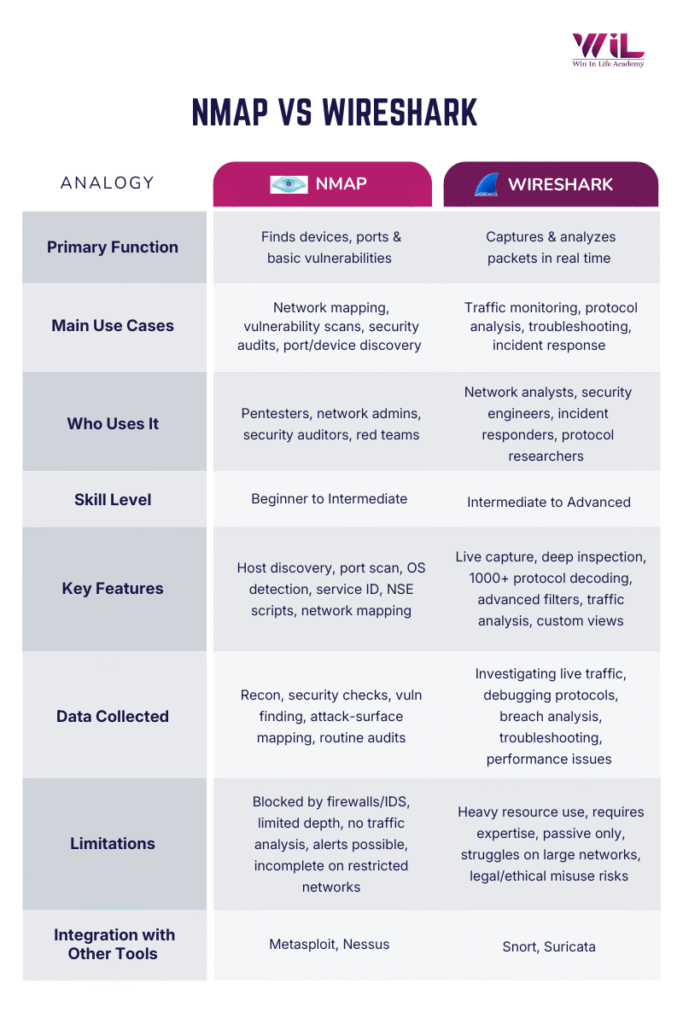
Both Nmap and Wireshark are powerful tools widely used in network security, but they serve different purposes and have unique strengths. Understanding the Nmap vs Wireshark differences helps security professionals choose the right tool at each stage of network security and investigation. Here’s a detailed comparison of both tools across various aspects:
Primary Function
Nmap: Nmap actively scans a network to detect connected devices, open ports, running services, and basic OS information. It focuses on identifying what exists on the network and how each system is exposed.
Wireshark: Wireshark captures and decodes real-time network traffic, giving users the ability to observe communication at the packet level. It focuses on analyzing how data moves through the network.
Who uses it
Nmap: Ideal for penetration testers, network administrators, and security professionals who need to map networks, scan for vulnerabilities, and ensure that infrastructure is properly secured.
Wireshark: Best suited for network analysts, security engineers, and incident responders who need to analyze detailed traffic patterns, identify threats, and troubleshoot performance issues at a granular level.
Skill Level
Nmap: Nmap is generally accessible to beginner to intermediate users. Its basic features, like port scanning, are user-friendly, though its advanced capabilities (such as Nmap Scripting Engine (NSE)) may require more experience.
Wireshark: Wireshark is more suited to intermediate to advanced users, due to its complex interface and the expertise needed to interpret detailed packet-level data and network protocols.
What It Reports
Nmap: Nmap shows the network’s structure by identifying which systems are active, what ports they expose, and which services are accessible. It presents a clear overview that helps users spot potential entry points or misconfigurations.
Wireshark: Wireshark shows the content and behavior of the traffic itself by revealing packet details, protocol interactions, timing patterns, and anomalies within communication flows. It helps users understand what is actually happening inside network conversations.
Key Features
Nmap: Nmap’s features include host discovery, port scanning, service identification, OS detection, and the Nmap Scripting Engine (NSE). These allow users to run thorough scans and automate various security assessment tasks.
Wireshark: Wireshark’s strengths lie in deep packet inspection, real-time monitoring, protocol analysis, and advanced filtering options. These features make it an essential tool for detailed traffic analysis and monitoring.
Limitations
Nmap: Nmap can be blocked by firewalls or IDS/IPS systems, and its scans provide surface-level information. It doesn’t analyze live traffic, and aggressive scans may trigger alarms in secure environments.
Wireshark: Wireshark can be resource-intensive, especially with large volumes of captured traffic. It also requires advanced knowledge to analyze the data properly, and being a passive tool, it does not actively stop attacks.
Integration with Other Tools
Nmap: Nmap integrates seamlessly with tools like Metasploit for penetration testing and Nessus for vulnerability scanning. Its results provide valuable input for further analysis and attack simulations.
Wireshark: Wireshark works alongside security tools like Snort and Suricata for intrusion detection and network threat monitoring. It can also enhance Nmap results by analyzing traffic corresponding to open ports and services identified by Nmap scans.
Which tool should you learn first?
Choosing between Nmap and Wireshark depends on your goals and the stage of your cybersecurity journey. If you’re new to networking or seeking foundational knowledge, Nmap is the ideal starting point. It offers a straightforward approach to network mapping and security audits, allowing you to understand the basics of network infrastructure and potential vulnerabilities.
Once you’re comfortable with Nmap and the basics of network security, Wireshark becomes the next logical step. With its detailed packet analysis, Wireshark allows you to dive deeper into real-time traffic, troubleshoot complex network issues, and analyze protocols.
In summary, start with Nmap to get a broad overview of network scanning and security, then transition to Wireshark as your skills progress and you seek to understand the finer details of network traffic analysis.
Start with Nmap if you’re new to networking and need to understand the basic layout of a network. It provides a broad overview and is easier to grasp in the early stages of learning network security.
Start with Wireshark if you’re more focused on understanding what happens within the network once the connections are made. It’s more detailed and requires a good understanding of protocols and packet structures.
| PROFESSIONAL CERTIFICATE IN Cybersecurity Fundamentals Master practical, real-world cybersecurity and ethical hacking skills. This course teaches you how to analyze vulnerabilities, simulate attacks, secure systems, and interpret complex security data. It prepares you for technical roles across SOC operations, penetration testing, and modern security engineering. IN PARTNERSHIP WITH IBM ⭐ 4.8 (3,235 ratings) View Course – (https://wininlifeacademy.com/cyber-security-course/) Duration: 5 months Skills you’ll build: |
| Ethical Hacking Network Security Web Application Security Malware Analysis OSINT & Information Gathering Phishing & Social Engineering Linux for Security Penetration Testing Tools (Nmap, Metasploit, Burp) Defensive Security & IDS/IPS |
| Other Courses |
Real-World Applications for Nmap and Wireshark
Nmap and Wireshark are essential tools in network security, each serving a unique function. Their practical applications are invaluable for cybersecurity professionals. Let’s explore how these tools are applied in real-world situations:
Use Case Study: Nmap Scan Traffic Analysis for Network Detection
Scenario: A research team aims to understand how Nmap-generated network scans appear, with the goal of enhancing detection mechanisms (such as IDS/IPS). They simulate port scans using Nmap and capture the resulting traffic to distinguish scan traffic from normal network traffic.
Process: The team runs various Nmap scan types (host discovery, TCP SYN port scan, service, and OS detection) against target hosts to generate scan traffic. During scanning, they log packet metadata including source/destination ports, TCP flags, packet sizes, timestamps, and inter-packet timing. They then analyze the scan traffic by extracting statistical summaries of behaviors, such as port distribution and timing patterns, and identify scan indicators (IoS) that differentiate scan traffic from regular traffic.
Findings: The study revealed consistent patterns in Nmap traffic, including specific TCP flags, predictable window sizes, and destination port distributions. These patterns were consistent across various scan types, making them reliable indicators of scan behavior. Using these indicators, the researchers developed detection rules for a system called CNDR, which successfully detected Nmap scans with high accuracy and low false positives. The research concluded that Nmap’s traffic signatures are useful for improving network security detection and response strategies.
Use Case Study: Real‑World Network Analysis Using Wireshark
Scenario:
Imagine a small-to-medium enterprise in a busy research environment, struggling to manage its expanding network. As the network grows, so do the challenges of maintaining security and performance. Worried about vulnerabilities and attacks like DDoS, the company acts, leading them into a case study of Wireshark to understand how packet-level analysis helps detect threats and strengthen network resilience.
They embark on a four-week deep dive into the heart of their network traffic, determined to understand how data flows and to spot any potential threats before they cause real harm. Their tool of choice for this task? Wireshark.
Process:
The team sets up Wireshark in live-capture mode, allowing them to monitor and capture all traffic flowing through their network in real-time. From protocol headers to session data and payloads, Wireshark logs it all. The team then uses its filtering and protocol-decoding features to isolate different types of traffic, such as HTTP, DNS, TCP, and UDP, and carefully reconstruct streams for a closer look.
As the days pass and the logs accumulate, the team begins their analysis. They spot unusual spikes in DNS traffic, a potential indicator of a looming DDoS attack. Intrigued, they dig deeper, capturing HTTP traffic to ensure that sensitive data is transmitted securely.
Findings:
With Wireshark’s powerful packet-level analysis and session reconstruction, the team gains a clear, real-time view into their network’s activity. They uncover vulnerabilities, spot malicious traffic, and detect anomalies that might have otherwise gone unnoticed. They find that some traffic was unencrypted, raising red flags for potential breaches. Additionally, they monitor for availability issues and identify emerging DDoS traffic patterns.
By the end of the four weeks, the team has a comprehensive understanding of their network’s behavior and concrete steps to improve their security. Wireshark proves invaluable, not just for troubleshooting, but for fortifying the network’s security posture against future threats.
Conclusion
Nmap and Wireshark are both vital tools in network security, each serving a unique purpose. Nmap helps you scan networks, identify devices, and find vulnerabilities, showing what’s on the network. Wireshark, on the other hand, analyzes real-time traffic, helping you troubleshoot issues and detect threats, showing what’s happening on the network.
At Win in Life Academy, we offer cybersecurity course that not only cover the theoretical aspects but also equip you with the practical skills needed to effectively use Nmap and Wireshark for comprehensive network security. From discovering vulnerabilities with Nmap to analyzing traffic with Wireshark, WILA prepares you for a successful career in cybersecurity, providing access to industry-leading tools and expert guidance in an increasingly digital world.
FAQs
1. What is the difference between Wireshark and Nmap?
Nmap actively scans a network to discover devices, ports, and services.
Wireshark passively captures and analyzes network traffic at the packet level.
2. Is Nmap free or paid?
Nmap is completely free and open-source. There is no paid version.
3. Is Nmap used for vulnerability scanning?
Yes, but at a basic level. Nmap identifies open ports, services, and misconfigurations that indicate potential vulnerabilities. It’s not a full vulnerability scanner like Nessus.
4. Is Nmap needed for Wireshark?
No. Wireshark works independently.
However, Nmap is often used before Wireshark to identify targets and open ports for deeper traffic analysis.
5. Why is Nmap scanning illegal?
Nmap itself is not illegal.
Scanning networks without permission is illegal because it’s considered unauthorized reconnaissance. With proper authorization, Nmap scanning is legal and widely used.
6. Should I learn Nmap or Wireshark first?
Start with Nmap. It teaches network basics and exposure mapping.
Learn Wireshark after, once you understand how networks and protocols work.
7. Is using Wireshark illegal?
No. Wireshark is legal.
Capturing traffic without permission or intercepting private data is illegal. Authorized monitoring is standard practice.
8. Do cybersecurity professionals use Wireshark?
Yes. Widely.
Security analysts, SOC teams, incident responders, and network engineers use it daily.
9. What is Wireshark mainly used for?
It’s mainly used for packet capture, protocol analysis, troubleshooting, and detecting suspicious or malicious network activity.
10. Can Wireshark decrypt traffic?
Yes, but only if decryption keys are available.
Encrypted traffic like HTTPS cannot be decrypted without proper keys or session secrets.