Most lists of AI tools for beginners hand you forty names and walk away, which is exactly why they leave you more confused than when you started. The problem was never a shortage of tools. It is that nobody tells you which ones to actually open first, what each one is good for, and how far it can take you before you outgrow it.
Here is the part worth sitting with. McKinsey’s 2025 survey found that 78% of organizations now use AI in at least one business function, yet only about a third have managed to scale it across their work. Almost everyone has access. Very few have skill. That gap is the whole opportunity, and it is smaller to close than it looks.
This guide is built for that. Whether you are a final-year student, a fresher sizing up the job market, or a working professional who keeps hearing “learn AI” without a clear place to begin, the tools below are sorted by the job you need done and tagged by how far each one goes. Pick one, use it on something real this week, and you stop being a beginner faster than you would expect.
How do you choose an AI tool as a beginner?
Pick one tool, use it on a real task, and get comfortable before adding a second. That single habit beats every “ultimate stack” you will see online.
The trap is collecting tools instead of using them: bookmarking twenty platforms and ending up recognising logos while mastering nothing. Let the task you repeat most often pick your starting point, and lean on free tiers, which are good enough to build real skill long before any paywall matters.
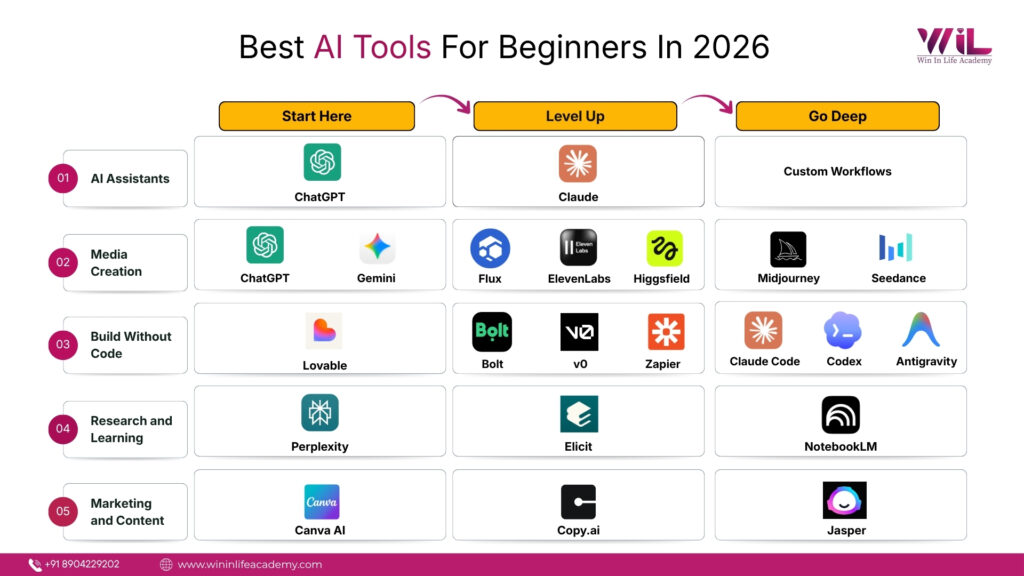
Every tool here carries one of three tags. Start here means you can open it today and get value within an afternoon. Level up means it is worth adding once your first tool feels natural. Go deep means it rewards real practice and is not where anyone should begin. Read the tags as a ladder, and climb only the next rung in the cluster that matches your work.
Quick snapshot: best AI tools for beginners in 2026
| Category | Start Here | Level Up | Go Deep |
|---|---|---|---|
| AI Assistants | ChatGPT | Claude | Custom Workflows |
| Media Creation | ChatGPT / Gemini Images | Flux, ElevenLabs, Higgsfield | Midjourney, Seedance |
| Build Without Code | Lovable | Bolt, v0, Zapier | Claude Code / Codex / Antigravity |
| Research and Learning | Perplexity | Elicit | NotebookLM |
| Marketing and Content | Canva AI | Copy.ai | Jasper |
What are the best AI assistants for beginners?
Start with ChatGPT, grow into Claude, and you have covered ninety percent of what a beginner needs. These conversational assistants are the foundation of AI tools learning, because almost everything else on this list depends on one skill: knowing how to ask an AI for what you actually want.
ChatGPT — Start here. This is the natural first tool for most people. It writes, explains, brainstorms, summarises, drafts code, and answers questions in plain conversation, which makes it the easiest way to learn what AI can and cannot do. The free tier covers real learning, and the paid Plus plan is around $20 a month for stronger models and higher limits. One thing to know before paying: the free and cheapest tiers now show ads in some regions, so check what each tier includes. For a role-specific walkthrough, our guide on how digital marketers use ChatGPT breaks it down level by level.
Claude — Level up. Claude is the genuine step up among assistants, strong on longer, more careful work: reading a long document, drafting something structured, or holding a complex thread without losing the plot. It tends to produce cleaner, better-organised writing straight away, which makes it a natural second assistant once basic prompting feels easy. The free tier handles everyday use, and Claude Pro runs about $20 a month, or roughly $17 billed annually.
If your work already lives inside Microsoft Office, Copilot is worth a look too, since it puts the same kind of assistant directly inside Word, Excel, and Outlook. But it is a convenience layer rather than a step up in capability, so it is not where your learning should start.
Getting genuinely good at these assistants is the highest-leverage move in this entire guide. That skill, prompting precisely and judging the output, is exactly what Win In Life Academy’s AI & ML Essentials program and GenAI Production Bootcamp are built around. If you would rather learn by doing, our top AI projects for beginners is a practical place to start.
That is where most beginners stop, and it is exactly why they stay beginners. Learn to build real AI workflows, not just type prompts, in the AI & ML Essentials Program from Win In Life Academy.
View CourseWhat are the best AI tools for media creation?
Here is the honest truth that most guides bury: there is no single best tool for AI images, video, or audio anymore. The frontier has fractured, and different models now win at different jobs. For a beginner, that sounds like bad news but is actually freeing, because it means the smart move is not picking the one perfect tool. It is starting simple, then using a multi-model platform that gives you several top models from one dashboard once you need range.
AI image generation
ChatGPT and Gemini — Start here. Both create images straight from a text description, with no new app and no new skill to learn. They are ideal for quick concepts, social graphics, and illustrations, and they travel inside a broader subscription you may already pay for.
Flux and Ideogram — Level up. As your needs sharpen, the specialists pull ahead. Flux leads on photorealism, which makes it the pick when an image needs to look like a photograph rather than AI art. Ideogram is the one that reliably renders readable text inside an image, so it wins for posters, logos, and anything with words on it.
Midjourney — Go deep. Midjourney is no longer the default king it once was, but it still owns one lane decisively: distinctive, art-directed, stylised imagery. It rewards practice, since learning its prompting style is what unlocks the quality, with paid plans from around $10 a month.
AI video generation
Google Veo — Start here. Veo is the safest all-rounder for a beginner, combining strong realism with native audio, which most models still cannot do well. Access runs through Google’s AI plans.
Seedance and Higgsfield — Level up. Seedance 2.0 currently sits at the top of independent video benchmarks for cinematic, multi-shot output with synchronised audio. The catch is access, which is where Higgsfield comes in. It is a multi-model hub that puts Seedance, Veo, Kling, and other leading video models behind a single dashboard, so you can switch between them without juggling six accounts. For a beginner, that is the more sensible entry point than chasing each model separately.
AI voice and audio
ElevenLabs — Level up. ElevenLabs produces realistic AI voiceovers and text-to-speech in many languages, widely used for videos, podcasts, and narration. The quality is what separates it from older robotic text-to-speech. Free covers basic generation, with paid plans from around $5 a month for longer audio and more voices.
A note on Sora: OpenAI’s video tool is being wound down in 2026, so it is deliberately left out of the picks above.
The takeaway is the pattern, not any single name. Treat one start-here tool as your training ground, and reach for a multi-model hub when you need professional range. This is exactly the kind of hands-on, production-focused work Win In Life Academy’s GenAI Production Bootcamp is designed around, turning scattered tool-tinkering into a real creative workflow.
Can beginners build apps and landing pages without coding?
Yes, and the progress feels almost unreal at first. Lovable, Bolt, and v0 turn plain-language prompts into working pages and apps, while Zapier turns prompts into automations and AI agents. But here is the honest part the hype skips: prompt-to-app feels magical right up until the technical cliff, the point where a pretty frontend has to meet real backend logic, databases, and deployment. Hitting that wall is not failure. It is the normal, expected edge of what no-code can do alone, and knowing it is coming saves a lot of frustration.
Lovable — Start here. Lovable builds landing pages and simple apps from prompts, generating the frontend so an idea becomes something clickable fast. It is the friendliest entry to prompt-to-app building. Free covers experimentation, with paid plans from around $25 a month for more projects and deployment.
Bolt and v0 — Level up. Bolt generates fuller full-stack apps from prompts in the browser, with more real coding capability than the lightest no-code tools, which is also where the technical cliff shows up soonest. v0 is the companion for clean frontend components and polished interfaces without designing from scratch. The two pair naturally.
Zapier — Level up. Zapier connects thousands of apps and now uses AI to build automations and agents from plain descriptions, so repetitive tasks run themselves. It is less about building a product and more about deleting busywork, with a free tier and paid plans from around $20 a month.
Claude Code, ChatGPT Codex, and Google Antigravity — Go deep. Once no-code starts to feel limiting, these developer-grade agentic tools are the next horizon, moving past simple prompting into AI that writes, runs, and debugs real code across a project. This is the aspirational top of the ladder, not the first step, and it is the territory Win In Life Academy’s GenAI Production Bootcamp is built to bridge toward.
Want to go from tinkering to building?
The gap between playing with no-code tools and shipping something real is a guided one. The GenAI Production Bootcamp takes you from prompts to working AI projects you can actually put on a resume.
View CourseWhich AI tools are best for research and learning?
Start with Perplexity for sourced answers, add Elicit when you need academic depth, and graduate to NotebookLM once you want AI working inside your own material. The promise of this cluster is simple: stop drowning in twenty browser tabs and half-read PDFs.
Perplexity — Start here. Ask Perplexity a question and it answers in a few sentences, then shows the sources it pulled from so you can check the claim instead of trusting it blindly. That sourcing habit is what makes it more useful than a plain chatbot for research and fact-checking. The free tier covers most everyday research, with paid plans from around $20 a month for higher limits and deeper research modes. Gemini is a strong free alternative here, especially if your work already lives in Google Search, Docs, and Drive.
Elicit — Level up. Elicit is built for academic research: finding relevant studies, summarising papers, and organising literature reviews. It saves hours of manual searching once your work involves real evidence, which is why it sits a rung above casual search.
NotebookLM — Go deep. NotebookLM is the most powerful of the three because it flips the usual approach. Instead of answering from the open web, it answers only from the documents you feed it. Upload your lecture notes, a stack of PDFs, or research papers, and it summarises, explains, and pulls insights strictly from that material, keeping every answer grounded in your own sources. For serious study and research, that control is what makes it the deep-end pick. It is free to start, with paid access through Google’s AI plans.
This is the cluster where analytical thinking compounds, and it maps directly to where Win In Life Academy’s Data Science and Business Analytics programs begin: turning raw information into structured, defensible insight rather than just faster Googling. If you are weighing that path, our look at whether AI will replace data analysts is worth a read.
What are the best AI tools for marketing and content creation?
Canva AI handles everything visual, while Copy.ai and Jasper handle copy at scale. For marketers, creators, and small business owners, this is where AI turns directly into output: social posts, ad copy, campaign visuals, and email.
Canva AI — Start here. Canva folds AI into a design tool millions already use, generating images, writing on-design copy, resizing for every platform, and producing social creatives from a prompt. The low barrier is the appeal, since you need no design background to make something usable. Free covers a lot, with paid plans from roughly $15 a month for the fuller AI and brand toolset.
Copy.ai — Level up. Copy.ai generates marketing copy, emails, product descriptions, and social content, and adds workflow features for producing it at volume. It is the step up once you have outgrown writing every caption by hand. Free covers experimentation, with paid plans from around $29 a month.
Jasper — Go deep. Jasper is the most business-focused of the three, built around brand voice, campaign workflows, and team content at scale. It is priced and designed for marketers and agencies rather than casual users, with plans from around $59 a month, which is why it sits at the deep end.
The difference between generating generic copy and running a real campaign is skill, and that is the territory of Win In Life Academy’s Digital Marketing course. For the prompting craft underneath it all, our guide to prompt engineering for digital marketers goes deeper.
A few honourable mentions
Some tools do not need a cluster of their own but earn a place for specific jobs. Grammarly quietly cleans up grammar, clarity, and tone wherever you write, making it the lowest-effort tool to adopt. Notion AI is worth it if you already organise your work in Notion, since it summarises notes and drafts content without leaving the page. And Gamma turns a rough outline into a finished presentation in minutes, which is a real time-saver once you are making decks often. None of these is a starting point, but each is a useful add-on when the task calls for it.
Why does learning AI tools matter more than knowing they exist?
Knowing these tools exist is no longer an advantage, because almost everyone has the same free access. Recall the McKinsey number: usage is near-universal, but only a third of organizations have actually scaled AI into how they work. The people who pull ahead are not the ones who know the most tools. They are the ones who know how to prompt precisely, judge and refine the output, and slot the right tool into a real workflow.
That is the gap that pays, and the distance across it is far shorter than it looks. The slow way to close it is scattered tutorials and random experimentation. The faster way is structured learning aimed straight at the workflows that matter. Win In Life Academy builds AI into all of its programs for exactly this reason, whether the goal is Digital Marketing, Business Analytics, Data Science, AI & ML Essentials, or the GenAI Production Bootcamp. Each one turns AI awareness into job-ready skill rather than another browser bookmark.
You now know the tools. The next step is knowing how to use them to get hired.
Win In Life Academy integrates AI into every program, so you build job-ready skills instead of just a longer bookmark list. Explore the courses and find your starting point.
Explore CoursesConclusion
The AI tools worth knowing in 2026 fall into a few clear clusters: assistants, media creation, no-code building, research, and marketing. The winning move is not learning all of them at once. It is choosing a single start-here tool this week, pointing it at something real, and climbing one rung when it feels easy.
Access is free and universal now, so skill is the only thing that separates people, and that is the part you can actually control. This is precisely what Win In Life Academy is built to give you: not another list of tools, but the guided practice that turns AI awareness into a real career skill across Digital Marketing, Data Science, Business Analytics, and AI itself. Pick your tool this week, pick your path, and start climbing. Nobody stays a beginner with AI for long.
Frequently Asked Questions (FAQs)
1.Do I need technical skills to use AI tools?
No. Most beginner AI tools run on plain conversation, simple prompts, or drag-and-drop, and need no coding knowledge to deliver real value.
2. Are free AI tools enough for beginners?
Yes. Free plans are usually enough to learn prompting, research, content creation, and basic automation. The first upgrade worth paying for tends to appear only after the beginner stage.
3. Which AI tool is best for studying and learning new topics?
Perplexity and Gemini are the best starting points for sourced answers, while NotebookLM is the most powerful once you want AI working strictly inside your own notes and PDFs.
4. Can AI tools help beginners be more productive at work?
Yes. Tools like Grammarly, Notion AI, and Gamma help you write cleaner, organise faster, and build presentations in a fraction of the usual time.
5. Which AI tools are best for beginners in content creation?
Canva AI, ChatGPT, and Copy.ai are the most beginner-friendly for producing social posts, visuals, captions, and marketing copy quickly.
6. Can beginners create images and videos using AI?
Yes. ChatGPT and Gemini handle images from a simple prompt, while Veo and multi-model hubs like Higgsfield open up cinematic video without juggling several accounts.
7. What is the best AI tool for video in 2026?
There is no single winner. Veo is the safest all-rounder, Seedance leads on cinematic quality, and a hub like Higgsfield lets beginners access several top models in one place.
8. Can beginners build websites or apps without coding?
Yes, up to a point. Lovable, Bolt, and v0 turn prompts into pages and simple apps, though complex backend and deployment work is where no-code reaches its limit.
9. How long does it take to learn AI tools properly?
Most people grasp the basics of one tool within a few days of real use. The jump from beginner to genuinely capable is usually about a focused week, not a matter of talent.
10. Which AI tool should beginners start with first?
ChatGPT, for most people. It is the simplest entry point and covers writing, learning, brainstorming, and research in one place, which makes it the natural foundation before adding anything else.